Signed. Sealed.
Provable.
Upload a PDF, place your fields, share a link. Every completed document carries a burned-in certificate of completion and SHA-256 content hashes anyone can compare against the live envelope record. Your counterparty needs no account. Neither does your wallet.
From document to proof
One clear signing path.
-
Upload document
Add your PDF.
-
Place & share
Set fields. Send the link.
-
Sign & complete
Signed PDF, completion certificate, hash.
The core signing loop.
Without another subscription.
Built for real agreements — client contracts, separations, NDAs, releases — with the evidence trail to stand behind them.
Consent, timestamps, IP and device for every signer — attached directly to the final PDF and retained with the envelope record.
Original and signed SHA-256 recorded on a verification page, so a downloaded copy can be checked against the envelope record.
Up to 8 signers, in order. Each gets a private link that activates only when it's their turn.
No trial clock, no per-envelope fees, no watermark ransom. Three envelopes a day, forever.
The guide
How to sign a document online
To sign a document online, upload it as a PDF, mark where each person signs and send each of them a private link. They confirm their email, agree to sign electronically, adopt a signature and finish. BL Sign then seals the PDF with a certificate of completion and a hash you can check later. Pick your route.
Send a PDF for signature
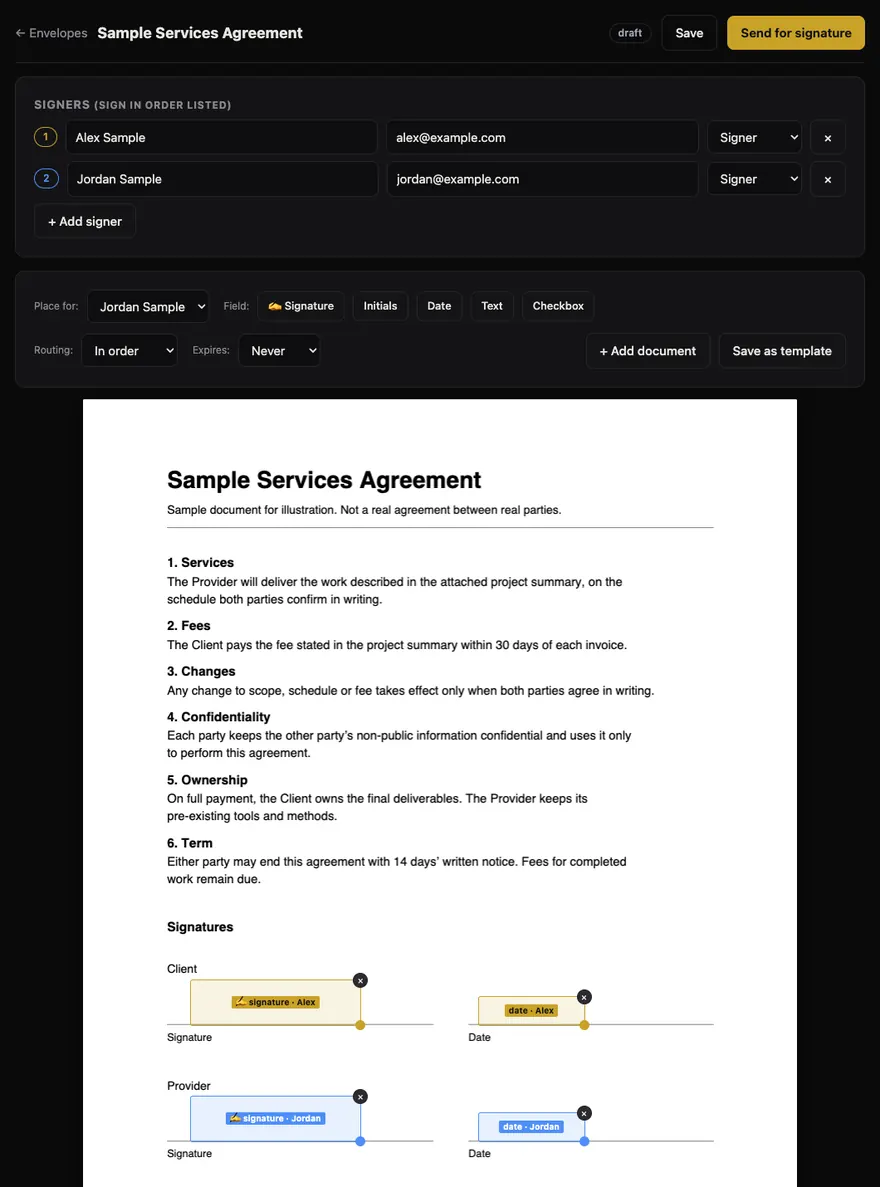
Have the final version ready, plus each signer’s name, email address and place in the order. Screens on this page come from BL Sign’s current code running a sample document, so the names, addresses and IP address shown are sample data.
- Enter your name and email.
Use the form at the top of this page and choose Continue to document upload. There is no password and no card. Your session is saved in this browser. BL Sign does not verify a sender’s email, so signers see yours marked unverified and the certificate says the same.
- Upload the final PDF.
Add a title and choose the file. PDFs only, up to 15 MB. Password-protected or damaged files are refused, and Word or Google Docs files need exporting to PDF first. Keep the title free of confidential details because it appears on the public verification record. Need several files in one envelope? Add document merges up to five PDFs, 30 MB in total.
- Add your signers.
Enter a name and email for each person, up to eight per envelope. Set someone to CC if they only need the finished copy. No email address for a signer? Leave it blank and you get a link to text them; they enter their own name and email when they open it. Senders aren’t emailed automatically, so add yourself as CC if you want the completion email.
- Place the fields.
Choose a signer, choose a field (signature, initials, date, text or checkbox) and click the page where it goes. Drag to move it and pull the corner to resize. Every signer needs at least one signature or initials field. Checkboxes are optional; the other fields are required.
- Set the order and the deadline.
In order gives each signer access after the previous one finishes. All at once emails everyone together. An envelope can stay open or expire after 7, 14 or 30 days. Save as template keeps the document and layout for next time.
- Send, then track it.
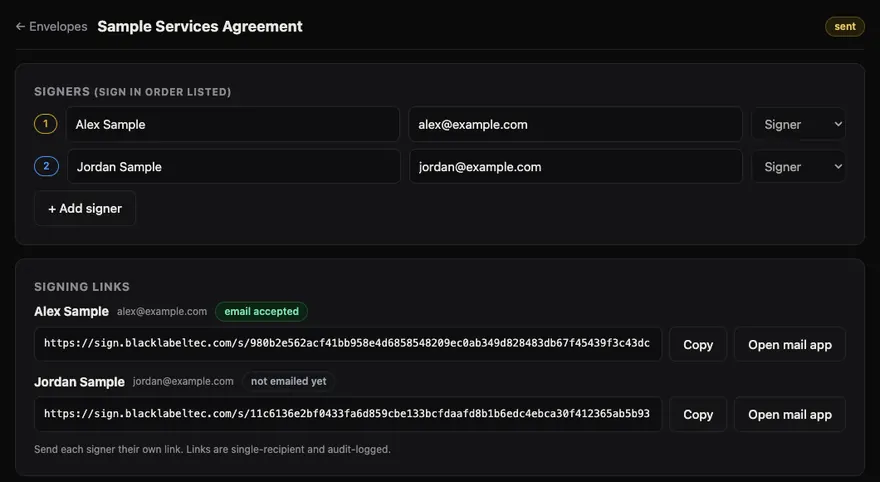
Send for signature locks the document. The envelope page then lists each person’s private link and a delivery state: email accepted, email failed or not emailed yet. Accepted means the mail service took the message, not that anyone read it. You can copy a link or send a reminder, and a signer with an email address gets an automatic reminder after about 48 hours, up to three reminders in total.
Sign a document someone sent you
There is nothing to create or install. Read the document before you sign it. If you weren’t expecting it, ask the sender through a channel you already trust, because self-serve senders are not verified.
- Open your link.
It arrives by email from BL Sign, naming the sender, or by text from the sender. You don’t need an account, an app or a payment. If someone has to sign before you, the page says so and you get an email when it’s your turn.
- Confirm your email.
Choose Email me a code and enter the six digits. The code lasts 10 minutes. If the sender didn’t have your address, you enter your full name and email first. This is how BL Sign ties the session to an inbox.
- Read the consent notice.
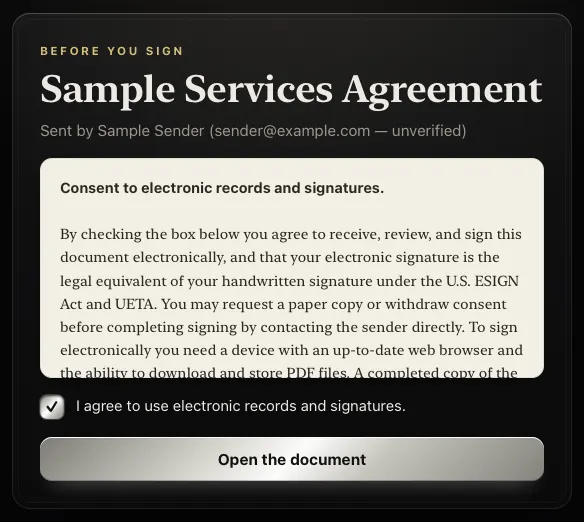
It says you agree to receive and sign electronically, that you can ask the sender for a paper copy or withdraw consent before you finish, and what you need to view and keep the file. Tick the box only if you agree. The time you agreed goes on the certificate.
- Review the document and fill it in.
The whole PDF opens in your browser with your fields highlighted. Next field walks you through them, and date fields start with today’s date. Don’t want to sign? Decline closes the envelope for everyone, and any reason you give is saved in the record for the sender.
- Adopt your signature and finish.
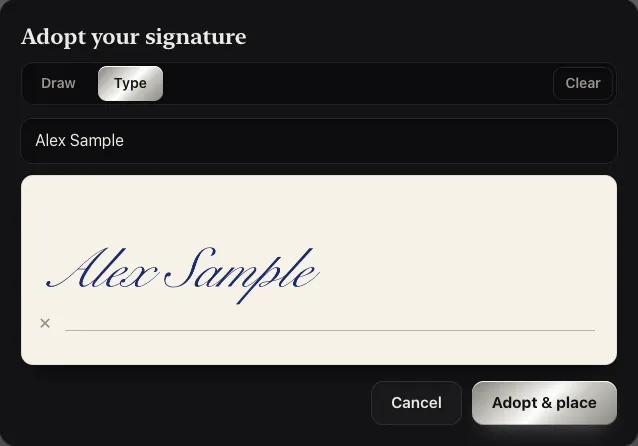
Draw with a mouse, finger or stylus, or type your name and BL Sign sets it in a script style. Choose Adopt & place, then Finish & sign. Keep the same link: it becomes your download once everyone has signed.
Sign a PDF yourself
BL Sign has no separate self-sign mode, so you use the normal route with yourself as the only signer: upload the PDF, enter your own name and email as the signer, place your fields, send, then open the link in your inbox. It uses one of your three envelopes for the day.
That takes a few more clicks than pasting a picture of your signature into a PDF. In return you get a consent record, timestamps, hashes and a certificate. The signing page works at phone width, so you can finish on your phone if the email lands there.
If you only need a picture of your signature to paste somewhere else, BL Sign doesn’t make one. The comparison below shows what each option gives you.
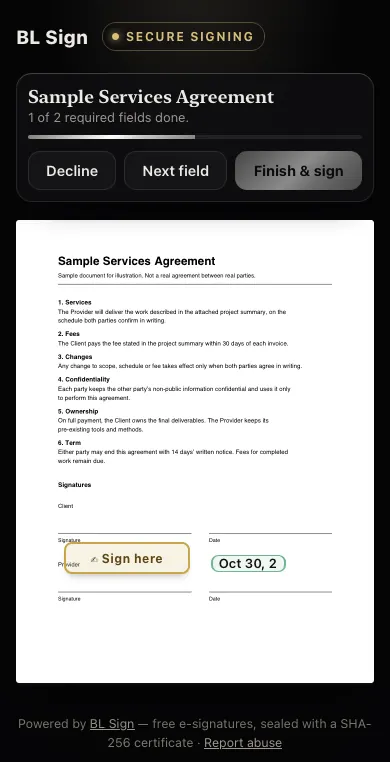
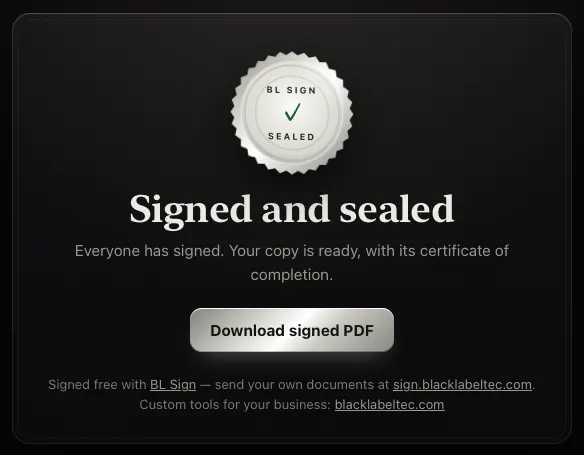
What happens when the last person signs
- BL Sign writes the signatures and field values onto the PDF pages.
- Every page gets a small footer line with the envelope ID and the verification address.
- The certificate of completion is added as new pages at the end.
- The SHA-256 of the finished file is recorded on the verification page.
- Everyone on the envelope, CC recipients included, is emailed their link to the finished PDF, and each signer’s link becomes a download.
What the audit record contains
Every completed PDF ends with a certificate of completion, built from the envelope’s record at the moment it is sealed. Here is everything on it.
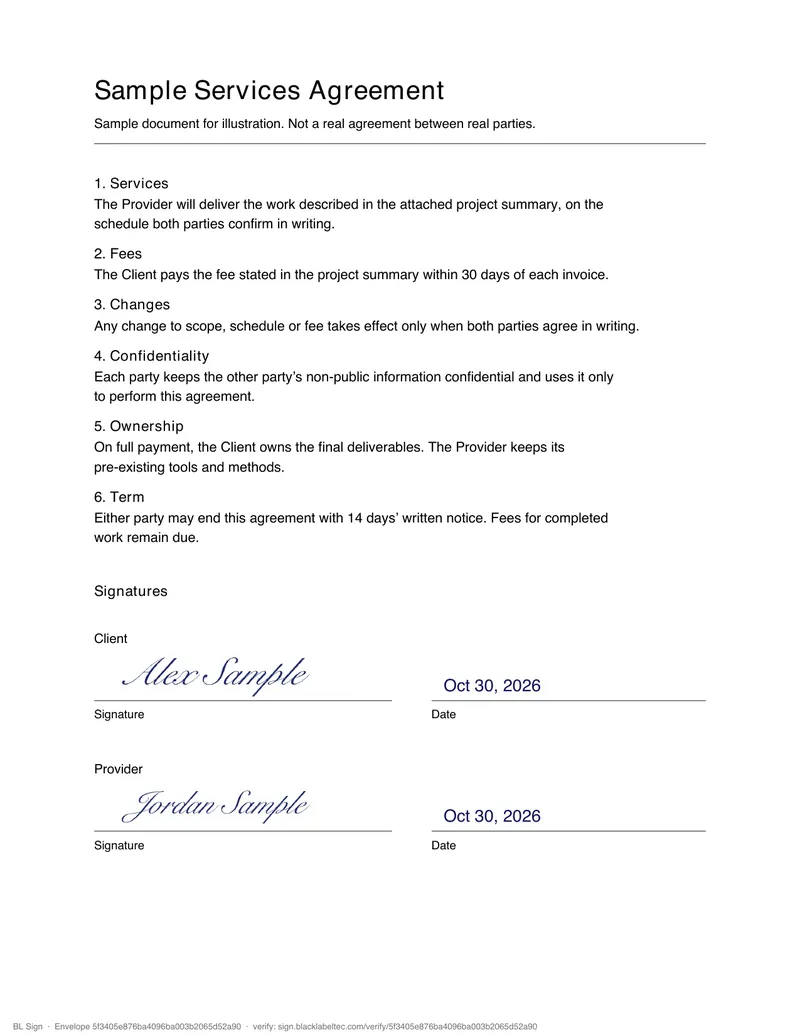
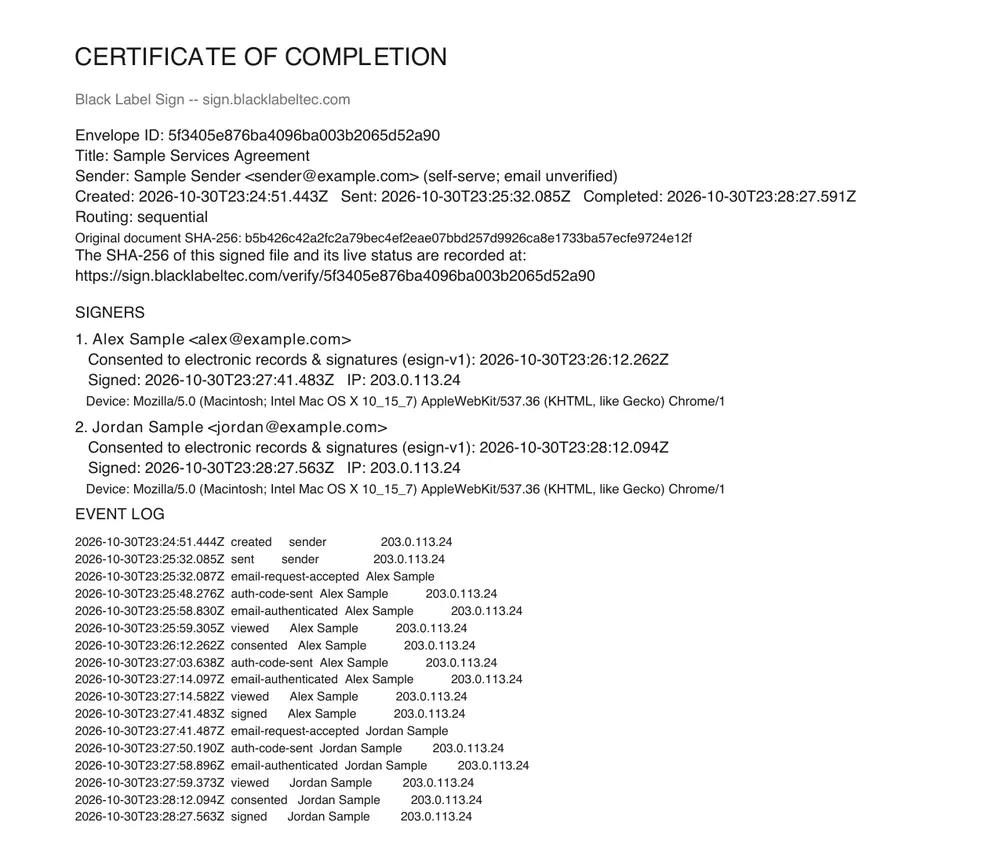
What the record can’t tell you. It shows what happened in the signing session. It doesn’t check a government ID, so “who signed” rests on access to an email inbox. It can’t show that a signer had authority or understood the terms, and it doesn’t establish notarization, a recorded deed or acceptance by a county office.
| On the certificate | What it shows |
|---|---|
| Envelope ID and title | The envelope’s unique ID and the title the sender typed. |
| Sender | Name and email. Self-serve senders are labeled self-serve; email unverified. |
| Dates | Created, sent and completed times in UTC, plus the expiry if one was set. |
| Routing | Sequential (in order) or parallel (all at once). |
| Original document hash | SHA-256 of the PDF being signed. When PDFs were combined, each source file’s name and hash are listed as well. |
| Verification address | Where the signed file’s own SHA-256 and live status are recorded. A file can’t contain its own hash, so this one lives on the record. |
| Each signer | Position in the order, name, email, the consent version (esign-v1) and time, the signing time, IP address and device (the browser’s user-agent string). |
| Copied recipients | Name and email of anyone on CC. |
| Event log | Timestamped entries with the person and IP address, such as created, sent, email accepted, code sent, email verified, viewed, consented and signed. Up to 120 entries. |
Check a signed PDF against its record
- Find the verification address.
It is in the footer of every page and on the certificate: sign.blacklabeltec.com/verify/ followed by the envelope ID.
- Open it.
The page shows the title, status, created and completed times, each signer’s name, state and signing time, and both SHA-256 values.
- Compute the hash of your copy.
Run one of these on the file you have:
# Mac
shasum -a 256 file.pdf
# Windows
certutil -hashfile file.pdf SHA256
# Linux
sha256sum file.pdf
- Compare it with Signed-file SHA-256.
On the sample shown here, the command printed:
838865267243a33857934d0b366d40a894f0a96424dbb11442cf57537befbf29
That matches the record, so the file has the same bytes that were sealed. Renaming a file doesn’t change its hash; editing it, and usually re-saving it, does. If yours doesn’t match, keep both files and find out which one changed before relying on either.
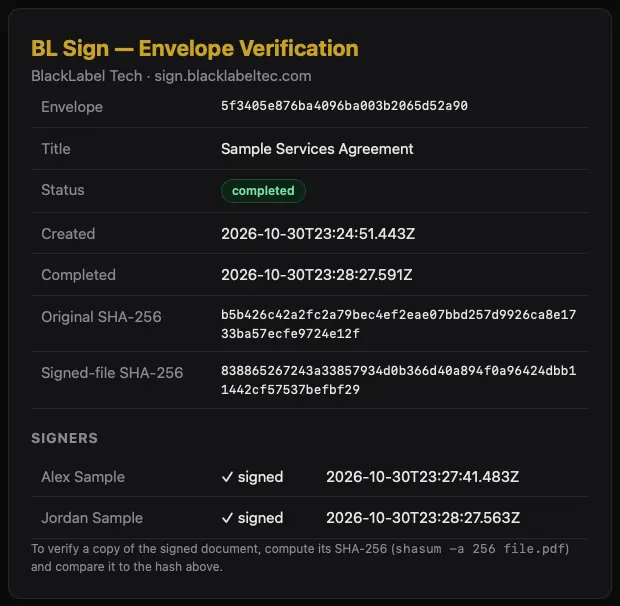
Who can open this page? Anyone with the address. It shows signer names but not their email addresses, and not the document. Verification pages are kept out of search engines. If the sender deletes the envelope, this page goes with it, which is another reason to keep your own copy.
What it costs
BL Sign has one public tier and it’s free. There is no trial clock, no per-envelope fee and no card field. These are the limits on it today, and the Terms say they can change.
| Item | Free tier today |
|---|---|
| New envelopes | 3 per sender per day. The count resets at midnight UTC, and starting from a template counts as one. |
| PDF size | 15 MB per file. Up to 5 files combined in one envelope, 30 MB in total. |
| People per envelope | Up to 8, counting anyone on CC. |
| Fields per envelope | Up to 200. |
| Saved templates | Up to 5. |
| Signers | Pay nothing and need no account. |
| Marks on your pages | One small footer line. There is no trial watermark. |
| Service-wide controls | Rate limits and abuse controls apply to everyone. |
Is an online signature legally valid?
General information about two U.S. laws, not legal advice. BL Sign doesn’t decide whether a document is valid or a signature is enforceable, and nothing here is a legal guarantee. For anything consequential, talk to a lawyer.
The ESIGN Act
This federal law from 2000 covers transactions in or affecting interstate or foreign commerce. A signature, contract or other record can’t be denied legal effect, validity or enforceability solely because it is electronic (15 U.S.C. § 7001).
An electronic signature is an electronic sound, symbol or process, attached to or logically associated with a record and executed or adopted by a person with the intent to sign (§ 7006). The definition names no format, which is why a typed name or a drawn mark can qualify.
UETA
The Uniform Electronic Transactions Act is a uniform act the Uniform Law Commission published in 1999 for states to adopt. Most states have enacted it, some with their own changes, so check your state’s version.
It sets a similar rule at the state level. It applies where the parties have agreed to conduct the transaction electronically, and that agreement can be shown from the context and the parties’ conduct.
What these laws don’t do
Neither law makes every electronic signature valid. They remove one objection: that the signature is electronic. A document can still fail for other reasons, such as a signer without authority, fraud, or a rule requiring a particular form.
Documents ESIGN leaves out (§ 7003). Its rule doesn’t apply to:
- Wills, codicils and testamentary trusts
- Adoption, divorce and other family-law matters
- Most of the Uniform Commercial Code, apart from sections 1-107 and 1-206 and Articles 2 and 2A
- Court orders, notices and official court documents
- Notices of utility shut-offs
- Notices of default, repossession, foreclosure or eviction on a primary residence
- Notices cancelling health or life insurance
- Product recall notices where health or safety is at risk
- Documents that must travel with hazardous materials
Being left out means other law decides, not that e-signing is banned. UETA has its own exclusions, and states can add rules. Some processes also need a notary, witnesses or a filing with a public office, and BL Sign does none of those.
Consumer disclosures. When another law requires information to be given to a consumer in writing, ESIGN adds steps before an electronic version counts. The consumer must affirmatively consent after a clear statement covering paper copies, withdrawing consent and the hardware and software needed (§ 7001(c)). BL Sign’s consent notice touches those topics, but the Terms make the sender responsible for required disclosures. If you send regulated consumer documents, have counsel review what you need.
ESIGN and UETA are U.S. laws, and rules elsewhere differ.
Where BL Sign fits
These groupings are a practical way to think about it, not a legal test.
| What people usually look at | What BL Sign does | What stays with you |
|---|---|---|
| Intent to sign | The signer adopts a signature and presses Finish & sign. The signed event is logged. | Making sure the signer knows what they are signing. |
| Consent to sign electronically | A consent box for each signer, with the version and time on the certificate. | Any further disclosure your transaction requires. |
| Who signed | A six-digit code sent to the signer’s email, plus IP address and device. | Using the right address and deciding whether an email check is enough. |
| Signature tied to the document | The signature is written onto the PDF and the sealed file’s SHA-256 is recorded. | Keeping versions labeled and checking the hash when it matters. |
| Keeping the record | The signed PDF and certificate are available to each recipient by link. | Downloading and storing them. Permanent retention isn’t guaranteed. |
Signature image, e-signature or digital signature?
These terms get mixed up, and they give you different things.
| Compare | Signature image pasted into a PDF | E-signature through BL Sign | Certificate-based digital signature |
|---|---|---|---|
| What it is | A picture of your name, added with a PDF editor. | A signature you adopt, plus a record of the signing session. | Cryptography applied to the file using a certificate tied to the signer. |
| Consent record | None by itself. | Yes, for each signer. | Depends on the tool. |
| Who, when and from where | None by itself. | Email check, timestamps, IP address and device. | Certificate identity and signing time. The rest depends on the tool. |
| Shows if the file changed | No. | Yes, by comparing SHA-256 with the verification record. | Yes, PDF readers can validate it. |
| Available in BL Sign | Not as a download. | Yes. | No. |
A SHA-256 hash isn’t a digital signature. It lets anyone compare two copies of a file, and BL Sign hosts the reference value. The signed PDF itself carries no cryptographic signature for a PDF reader to validate, so a reader’s signature panel will show nothing. If a recipient requires certificate-based signatures, use a tool built for that.
Who BL Sign is for
It was built for real agreements between people who want the evidence without another subscription. It isn’t the right tool for everything.
A good fit
- Freelancers and consultants sending client contracts or statements of work.
- Small businesses handling NDAs, releases and separation agreements.
- Anyone sending up to three new envelopes a day who doesn’t want a monthly bill.
- Senders whose signers won’t create an account or install an app.
- People who want to see the evidence format before relying on it. It’s all on this page.
- Property paperwork, once you have confirmed what the receiving authority requires.
Not a fit
- Protected health information. The public service has no Business Associate Agreement and isn’t offered for PHI.
- More than three new envelopes a day.
- Anything needing government ID checks, notarization, witnesses or official filing.
- Documents that must carry a certificate-based digital signature.
- Signers who need to see a verified sender. Self-serve senders are labeled unverified.
- Wills, family-law and court documents, and the other categories above, unless your lawyer says otherwise.
- A guaranteed long-term archive. Keep your own copy of finished PDFs.
Privacy, security and accessibility
The short version of the Privacy notice and Accessibility statement. Those pages are the full text.
Where documents live
Envelope records, participants, fields and audit events are stored in Cloudflare D1. Original PDFs, signature images and signed PDFs are stored in Cloudflare R2.
How access works
Each recipient gets their own link and enters a code sent to their email. BL Sign uses encryption in transit, access tokens, signed secure cookies, rate limits and audit logging. No service removes all risk, so upload only what the agreement needs.
What isn’t done with your data
BL Sign doesn’t sell personal information or use document data for targeted advertising.
Measurement
Public pages like this one use PostHog analytics with form fields masked. Envelopes, signing pages and documents don’t load it. Global Privacy Control and Do Not Track turn it off.
Deleting your data
In My envelopes you can permanently delete one envelope, with its PDFs, signature images, audit events, hashes and verification page, or erase your whole sender account. Neither can be undone.
Accessibility
BL Sign targets WCAG 2.2 Level AA, an engineering target rather than a third-party certification. You can type a signature instead of drawing one, and signing doesn’t require a pointer. Uploaded PDFs aren’t made accessible automatically, so senders should provide an accessible document or an alternative.
Common questions
How do I sign a PDF online for free?
Enter your name and email at the top of this page, upload the PDF, add yourself as the signer, place a signature field and send it. Open the link in your inbox, enter the emailed code, agree to the consent notice, adopt a signature and choose Finish & sign. You can then download the signed PDF with its certificate.
Do signers need an account?
No. A signer opens a private link and enters a six-digit code sent to their email. If the sender texted the link instead, the signer enters a name and email first and gets the code the same way. There is no app, password or payment.
Do I need an account to send a document?
There is no password or account setup. Your name and email start a session saved in that browser for up to a year. My envelopes shows what you sent from that browser. It won’t appear on another device or after you clear cookies, so keep your completed PDFs.
Is BL Sign really free? What’s the catch?
It costs nothing and asks for no card. The catch is the limits: three envelopes per sender per day, 15 MB per PDF and eight people per envelope. The Terms also say limits can change and permanent retention isn’t guaranteed, so download what you need to keep.
Are electronic signatures legally binding?
In the U.S., the ESIGN Act and UETA say a signature or record can’t be denied legal effect solely because it is electronic. That doesn’t make every signed document enforceable, and some document types are excluded or have extra requirements. BL Sign gives no legal guarantee and this isn’t legal advice. Ask a lawyer about anything consequential.
What does the certificate of completion include?
The envelope ID and title, the sender, created, sent and completed times, routing, the original file’s SHA-256, each signer’s name, email, consent time, signing time, IP address and device, any CC recipients, and a time-stamped event log. It is added to the end of the signed PDF.
How can I tell if a signed PDF was changed?
Open the verification address printed at the bottom of each page, compute the SHA-256 of your copy (shasum -a 256 file.pdf on a Mac) and compare it with the Signed-file SHA-256 on that page. A match means identical bytes. A mismatch means a different file, even if it looks the same.
Can I sign on my phone?
Yes. Signing runs in your phone’s web browser with nothing to install. You can draw your signature with a finger or type your name.
Can I sign a Word document or Google Doc?
Not directly. BL Sign accepts PDFs only, so export the document to PDF first and check every page. Remove any password from the PDF before you upload it, because password-protected files are refused.
Can I type my signature instead of drawing it?
Yes. In the Adopt your signature window, choose Type and your name appears in a script style. You can edit the text, or switch to Draw. Either way the signature is written onto the PDF at the field the sender placed.
Can several people sign the same document?
Yes, up to eight people per envelope, counting anyone on CC. Choose In order so each signer gets access after the previous one finishes, or All at once to email everyone together.
What happens if someone declines to sign?
The envelope closes for everyone and nothing is signed. The signer’s optional reason is saved in the envelope’s record for the sender. To try again, the sender starts a new envelope.
Do signing links expire?
Only if the sender sets an expiry of 7, 14 or 30 days. After that, signing stops and the sender has to send it again. Separately, an emailed code lasts 10 minutes and a verified signing session lasts 12 hours, then the signer requests a new code.
Who can see my document?
People you add get recipient-specific links and must enter an emailed code to open them. A separate verification page, reachable only with its hard-to-guess address, shows the title, status, dates, signer names and hashes, but not the document itself, so keep confidential details out of the title. The Privacy notice covers how the operator and its infrastructure providers handle data.
Does the signed PDF have a watermark?
There is no trial watermark. Each page gets one small footer line with the envelope ID and verification address, and the certificate is added as extra pages at the end. Apart from the fields you placed, your page content isn’t changed.
Does BL Sign notarize documents or check ID?
No. It checks access to an email address. It doesn’t verify government ID, notarize, provide witnesses or file anything with a court or county office. If your document needs any of those, complete that step separately.
Can I use BL Sign for medical or health records?
No. The public service isn’t offered for protected health information, and no Business Associate Agreement applies. Please don’t upload PHI.
How long are signed documents kept?
Records are kept to provide access and evidence while the service operates or until an authorized deletion. The Terms don’t guarantee permanent retention, so download the completed PDF and keep your own copy.
More BL Sign guides
- Prepare a PDF for signing
- Plan sequential signing
- Understand the completion certificate
- Verify document identity with hashes
- Prepare signers for the document flow
- Prepare property-related documents
- Plan within free envelope limits
- Keep a clear signing record
Reviewed October 30, 2026 against the live product. BL Sign is operated by Michael Barber under BlackLabel Tech. See the Terms and Privacy notice.
Stop renting your signatures.
Send your first document in the next minute.